Overview

The Port Forwards function allows you to tunnel network traffic privately across the secure connection between the control and the agent, so you can reach remote services without having to expose them to the internet.
How traffic flows
A port forward works like a normal client/server connection, stretched across the secure connection between the control and the agent.
Control to Agent
Reach a service on the agent from the control - for example, a web server running on the agent.
Agent to Control
The reverse: something on the agent reaches a service on the control - for example, a program on the agent sending data to a database on the control, or on a machine the control can reach.
Add Port Forward
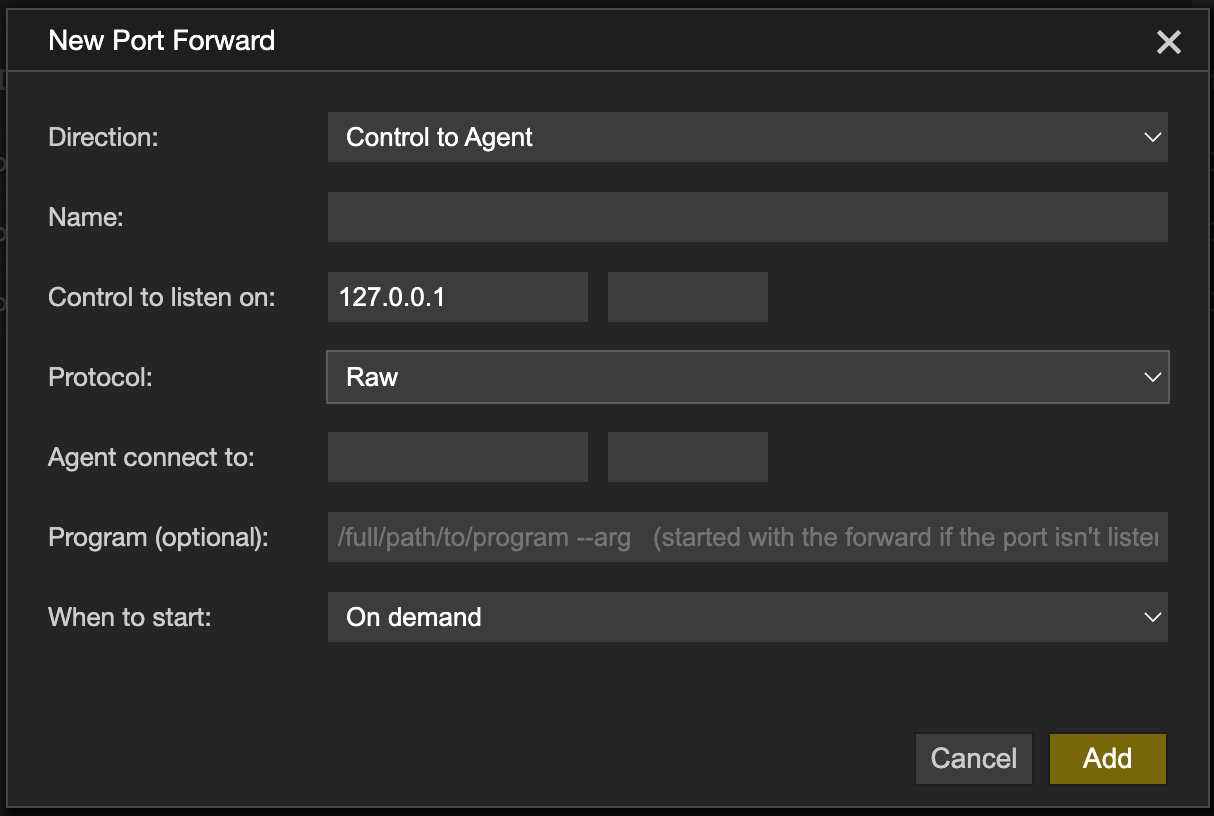
- Click Add Port Forward
- Choose the Direction:
- Control to Agent - listens on the control and connects out from the agent. Use this to reach a service on or near the agent
- Agent to Control - listens on the agent and connects out from the control
- Fill in the details:
- Name - a descriptive name
- Listen on - the port to listen on. The address is fixed at 127.0.0.1
- Protocol - see the table below
- Connect to - the address and port to connect to on the other side. Needed for Raw and UDP
- Program (optional) - see Starting a program
- When to start:
- On demand = opened manually when required
- On connection Professional - opens when a connection to the agent is established
- Click Add
| Raw | A TCP forward to one address and port |
| UDP | A UDP forward to one address and port |
| Socks | A SOCKS proxy - the application using it chooses where each connection goes, so no Connect to address is needed |
Starting a program
A Raw, Control to Agent forward can start a program on the agent when it opens. Give the full path to the program followed by any arguments.
- This is designed to starting of a server that the port forward will connect to
- The program is stopped when the port forward is closed
Using a port forward
Right-click a port forward to open its menu. The options offered depend on its state and on your profile.
| Open | Start the port forward |
| Close | Stop the port forward (and any program it started) |
| Open in browser | Open the controls web browser and navigates/connects to the port forwards address (only offered for Control to Agent Raw forwards) |
| Edit | Edit the port forward's details |
| Remove | Delete the port forward |
Permissions
📌 The options available to you depend on the agent's settings and your operator profile.
| Permission | Set in | Allows |
|---|---|---|
| Port Forwards | Agent settings | Using port forwards on this agent |
| Tasks | Agent settings | Starting a program with a forward |
| Allow Port Forwards | Operator profile | Opening Port Forwards |
| On Demand | Operator profile | Open, Close and Open in browser |
| Add/Remove Port Forwards | Operator profile | Add Port Forward, Edit and Remove |
| On Connect | Operator profile | Forwards that open automatically when the agent connects |
| Allow Tasks | Operator profile | Starting a program with a forward |
See Configuration Options for all the settings.